Here’s a simple pointer you can use when using Firefox with Sharepoint 2007 that makes life much easier. The first thing you will notice when visting your Sharepoint site will be a pop-up box asking you to login. This is because by default Firefox won’t pass NTLM credentials like Internet Explorer does. You have to specify trusted URLs that Firefox will pass credentials to. In the pop-up box, you will see the site or server name it’s trying to authenticate against. Just use your mouse to highlight this and press Ctrl + C to copy. Cancel the login box and in your address bar, type the following:
about:config
These are the advanced settings for Firefox where you can customize pretty much anything on the browser. Click the “I’ll be careful, I promise!” button and scroll down until you find:
network.automatic-ntlm-auth.trusted-uris
Double click on it and press Ctrl + V to paste your URL. You can add more URLs by seperating them wite a comma like this:
http://sharepointsite1, http://sharepointsite2, http://sharepointsite3
Now trying navigating to your Sharepoint site and it will automatically login.
Anyone that builds SharePoint environments knows CodePlex (Microsoft’s Open Source Project Community) is the biggest hub for free SharePoint solutions. I’m always looking for add-ons to play with in my SharePoint farms. Here are a few that I find very useful. MAKE SURE to test them out in a test farm before deploying to a production environment!!! Every company’s SharePoint farm is unique so you must make sure a 3rd party add-on doesn’t break functionality for existing or custom webparts or create security issues before deploying to a live farm:
1. SharePoint Learning Kit (SLK) – http://slk.codeplex.com/ - Used as an e-learning and delivery system. Think of it as a student teacher portal. A lot of school districts like this one and it has a huge following.
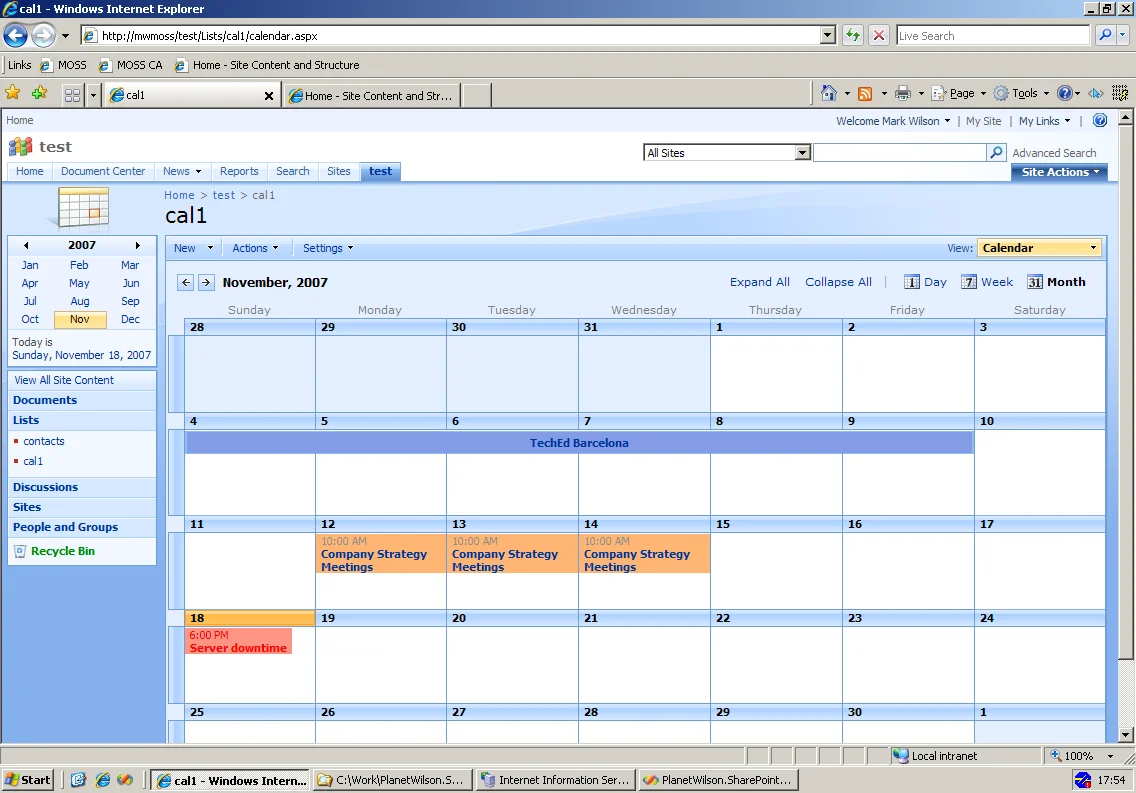
2. PlanetWilson Color Calendar – http://planetwilson.codeplex.com/ - Gives you the ability to color code Sharepoint calendar entries. Immensely popular with users! Once you install it, you’ll wonder how you ever used a Sharepoint calendar without it. Big kudos to Mark Wilson for developing this project!
3. Smart Tools for Sharepoint – http://smarttools.codeplex.com/ - A ton of nice little tools that will make your life as an admin or user easier.
4. ChartPart – http://chartpart.codeplex.com/ - Generate graphs from Sharepoint lists. A lot of users request this feature so give it a shot. There are other alternatives out there too that I have tried but ChartPart has been prettty popular with my end users.
5. SharePoint Access Checker Webpart – http://accesschecker.codeplex.com/- Allows site owners to check access for users within their site. Helps keep requests to Sharepoint farm admins down when site owners can easily check their security settings. It can also check permission inheritance.
6. SPWakeup – http://spwakeup.codeplex.com/ - I had previously made a blog entry about this. It allows you to “warm up” your Sharepoint farms so the first users of the day don’t have to wait for your app pools to spin up and your IIS cache to be rebuilt.
These are just a few I find very useful. Hope they help you out!
So let’s say you have http://originalurl and you want to change it to http://newurl. Don’t do it through IIS!!! Pretty much everything you will ever need to manage a Sharepoint farm will always be found in CA. Here’s how you accomplish this simple task:
1. Login to CA
2. Click the Operations tab
3. Click on “Alternate Access Mappings” under Global Configuration
4. In the top right, the default view is “Show All”. Just choose the web application you want to change.
5. Click Edit Public URLs and change the URL to whatever you want it to.
Done! Test it out and verify it works.
If you’re running Sharepoint, I can bet if you try using it in the morning, it takes a good while before the page initially loads up. Then for the rest of the day, every page you hit is lightning fast. This is because the IIS application pool for Sharepoint resets at night between 1AM – 2 AM (right click on the application pool in IIS and check the Recycling tab for the exact time on your server). When you access the page for the first time in the morning, IIS has to wait for the application pool to “warm up” and rebuild the cache before it presents the page to you.
I had been using the scripts that Joel Oleson (Former Sr. Technical Product Manager for SharePoint at Microsoft & current Sharepoint Evangelist) made available on his blog back in 2006 for the longest time:
http://blogs.msdn.com/joelo/archive/2006/08/13/697044.aspx
Since then, a tool called SPWakeUp has been created inspired from these scripts and I have been using this on all my Sharepoint and Project front end servers instead. It is maintained at CodePlex here:
http://www.codeplex.com/SPWakeUp
Just follow the instructions and set it up as a scheduled task to run on your web front ends after the app pool recycles at night. I created a .bat file containing the following arguments that the scheduled task is pointed at:
C:\SPWakeUp\SPWakeUp.exe -discover -log:c:\SPWakeUp\log.txt
This will automatically discover all your Sharepoint sites (which is the default behavior of the tool anyway) and also log the results to a text file. This will eliminate the slow loading in the mornings of MOSS, WSS, PWA, etc.