Archive

Posts Tagged ‘pcibridge’

How to solve the VMware “PCI to PCI bridge detected” install loop

March 11th, 2010 Jason Samuel 3 comments

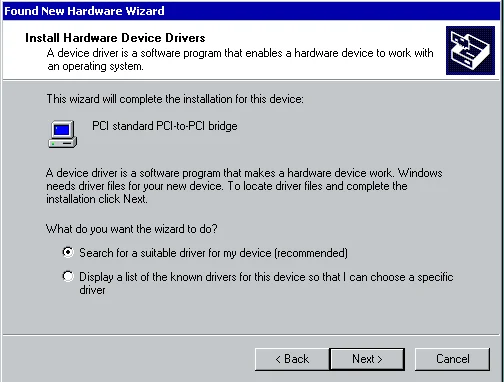
Have you ever P2Ved a server to an ESX cluster or converted a VMware Workstation VM into a VMware ESX 3.5 or vSphere 4.0 VM and come across this horrible Found New Hardware message that won’t go away.  Here’s a screenshot of a Windows 2000 Advanced Server that I had to fix and P2V after a catastrophic disaster (RAID failure) displaying this message:

Yes, it’s annoying and it seems like it will never go away.  You keep click on install and it keeps detecting after sucessfully installing as if it’s in a loop.  But the reality of it is that it’s not in a loop.  As silly as it sounds, you have to install it 32 times and it will finally go away! :)

The reason for this is because when you update the VM’s virtual hardware (specifically version 7 VMs from my experience), it comes with 32 separate PCI-to-PCI bridge devices that Windows detects and wants to install.  The only workaround I have found so far is to just sit there and install all 32 manually.  Or you can try editing your VMX and set:

pciBridge.present = False

which should work though I’ve never tried it personally.  Don’t want to potentially break something when it takes all of 2 minutes to install all 32 bridges.  Give it a shot and let me know if that fixes it for you guys. :)