Archive

Posts Tagged ‘.NET 2.0’

What’s new and actually useful in Server 2008 R2?

November 13th, 2009 No comments

newefficiency

I was lucky enough to attend the Microsoft New Efficiency event for Windows Server 2008 R2 on Monday.  It was a limited capacity technical briefing aimed at IT Professionals.  They also had an Exchange 2010 and Windows 7 track at the same time but I chose to attend the Server 2008 R2 track.  It was divided into 4 sections and was hosted by Kevin Saye (kevin.saye@microsoft.com) who is the Pre-sales technical support specialist for Windows Server in this region.  I’ve heard him speak at events before but never had a chance to actually do a QA session with him till now.

So, on to the new stuff in Server 2008 R2 that I found interesting!  This is not a comprehensive list by an means, just the stuff I thought was very useful.  I’ll go over each in detail in the coming days and how it will fit into your enterprise environment.

-Active Directory Administrative Center (ADAC)
-Managed Service accounts
-Active Directory Recycle Bin
-Graphical PowerShell
-Turning off CPU cores to conserve power
-Group policy can now execute Powershell scritpts
-Group policy granularity through item level targeting
-FCI to classify data and take actions on it
-.NET now runs on Server Core installs
-Remote Desktop Services now has multi-monitor support (up to 8 monitors), bi-directional audio (useful for VOIP), and enhanced multimedia support using your local graphics card instead of “screen painting” as it was before.
-DirectAccess with Windows 7 and Server 2008 R2 – Extends the network to include remote users instead of just a remote user dialing in via VPN.  Uses the Teredo protocol.  Was able to access the Microsoft intranet site (http://msw) without ever having to dial in and from behind a corporate firewall.  It uses IPsec and it only works with Windows 7 machines which are on the domain. 
-Branch Cache – Caches only the requested data unlike DFS.  Means a lot less space is required unlike DFS which is an exact duplicate.

THE FUTURE
Kevin says expect to see more componentization in MS products.  Expect to moved vhds around on servers like OS, Apps, & Data vhds interchangeably on your VMs.

Troubleshooting .NET 2.0 and WMI perfmon counters

August 7th, 2009 No comments

.NET 2.0 counters won’t show up in perfmon by default when using the /wmi switch.  They will show up in you just use regular perfmon but if you are trying to monitor .NET 2.0 counters via WMI, you are stuck.  Microsoft is aware of this and released 951683 to fix this issue.  You can request the hotfix from CSS here:

http://support.microsoft.com/kb/951683

This hotfix is included with .NET 3.5 SP1 onward so if you have it installed, you shouldn’t experience this issue.  After installing the hotfix (does not require a reboot), just restart the WMI service and run this from command line:

winmgmt /resyncperf

which will resync counters with WMI.  Then open perfmon using “perfmon /wmi”  and you will see the missing counters. 

You can also use the wbemtest.exe utility to test and troubleshoot WMI related issues.  Just run this from command line:

wbemtest.exe

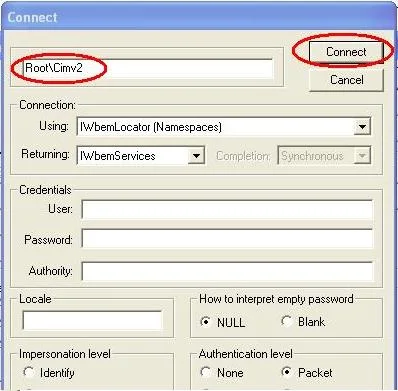
Click the Connect button and change the very first field to “root\cimv2″.  Then press Connect and then click Enum Classes on the next window.  Leave the superclass blank but change it to Recursive and press OK.  It will query every WMI class on the server and you can click on them to get further details.  This should help you tremendously if you write your own WQL queries! :)