
If you use SEP (Symantec Endpoint Protection) on your Citrix servers, you will notice that performance on your server takes a huge hit if you leave Symantec as is. Specifically increased RAM and CPU usage caused by multiple instances of SmcGui.exe and ccApp.exe processes for all the connected sessions.
Symantec has a great KB article here that addresses this:
http://www.symantec.com/business/support/index?page=content&id=TECH105060
You can disable SmcGui to prevent multiple instances of it running by adding following DWORD registry value on your Citrix server:
HKLM\SOFTWARE\Symantec\Symantec Endpoint Protection\SMC\LaunchSmcGui
and setting the value to 0. You can also disable ccAPP by deleting the ccApp entry at the following keys:
32 bit:
HKLM\SOFTWARE\Microsoft\Windows\CurrentVersion\Run
64 bit:
HKLM\SOFTWARE\Wow6432Node\Microsoft\Windows\CurrentVersion\Run
I didn’t want to go to each Citrix server and verify and/or make these changes manually so I created this little bat script I can execute remotely on each Server 2008 R2 box (you’ll want to modify for 32 bit boxes):
|
1 2 3 4 5 6 7 |
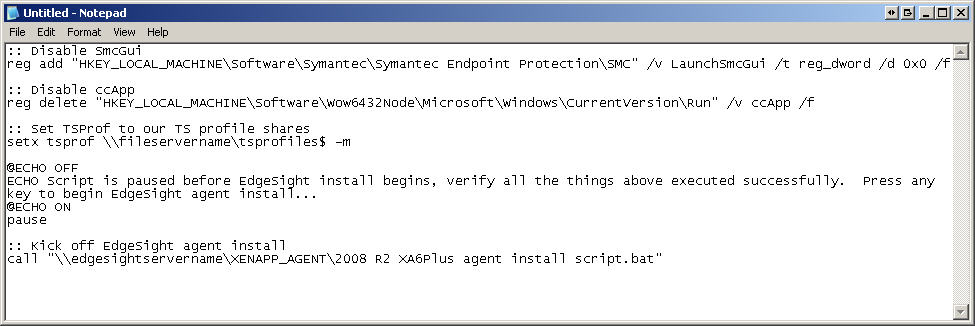
:: Disable SmcGui reg add "HKEY_LOCAL_MACHINE\Software\Symantec\Symantec Endpoint Protection\SMC" /v LaunchSmcGui /t reg_dword /d 0x0 /f :: Disable ccApp reg delete "HKEY_LOCAL_MACHINE\Software\Wow6432Node\Microsoft\Windows \CurrentVersion\Run" /v ccApp /f |
Now when building a new XenApp server (i.e. not from a template), I wanted to use this same script as a “post-install script” after installing XenApp but with a few other things included. One thing I wanted is to set the Terminal Server roaming profile path (assuming you are not doing it with GPO already). So I add this to the script:
|
1 2 |
:: Set TSProf to our TS profile shares setx tsprof \\fileservername\tsprofiles$ -m |
I also want to install my EdgeSight agent at this time. I wrote a a few installs script for this already in my post here:
so I will call on these bat scripts from the script I am writing now. But I want it to pause and let me verify that the Symantec changes happened successfully. So I add this first:
|
1 2 3 4 5 6 |
@ECHO OFF ECHO Script is paused before EdgeSight install begins, verify all the things above executed successfully. Press any key to begin EdgeSight agent install... @ECHO ON pause |
then finally I call on the EdgeSight agent install script (which will reboot your system after installing automatically). I have it shared off my EdgeSight server under the “XENAPP_AGENT” share so my script looks like:
|
1 2 3 |
:: Kick off EdgeSight agent install call "\\edgesightservername\XENAPP_AGENT\2008 R2 XA6Plus agent install script.bat" |
So my final script will look like this screenshot:
Hope this helps. Let me know if there is anything that any of you would like to see added.



Eamonn
May 10, 2012 at 9:29 AM
The newer SEP 12.1.1 that came out in April 2012 version seems to prevent changes to this reg key.
Endpoint “Protection SMC LaunchSmcGui” 0
Tom
February 25, 2013 at 3:20 PM
Any remedies for the issue Eamonn points out??
Thank you, Tom
Jason Samuel
February 25, 2013 at 3:32 PM
I’m afraid I can’t replicate the issue in a SEP 12.1.1 environment. Using The script continues to work fine for me. Are you running it as an administrator?
Eamonn Deering
February 25, 2013 at 3:43 PM
@Jason Samuel
I got it working. As far as I remember you have to disable Symantec Tamper protection if its on.
You can enable it after the reg change.
Jason Samuel
February 25, 2013 at 3:56 PM
Thanks for the update!
John
February 6, 2014 at 1:55 PM
If we enable SEP, Windows Explorer that published on Citrix server will not run. you have to open any other applications on same server and then launch Windows Explorer icon.
is there any way, we can resolve this issue?