
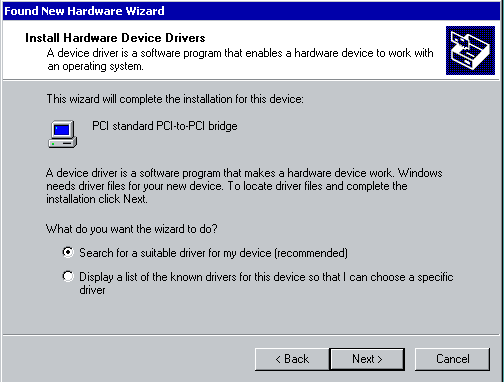
Have you ever P2Ved a server to an ESX cluster or converted a VMware Workstation VM into a VMware ESX 3.5 or vSphere 4.0 VM and come across this horrible Found New Hardware message that won’t go away. Here’s a screenshot of a Windows 2000 Advanced Server that I had to fix and P2V after a catastrophic disaster (RAID failure) displaying this message:
Yes, it’s annoying and it seems like it will never go away. You keep click on install and it keeps detecting after sucessfully installing as if it’s in a loop. But the reality of it is that it’s not in a loop. As silly as it sounds, you have to install it 32 times and it will finally go away! 🙂
The reason for this is because when you update the VM’s virtual hardware (specifically version 7 VMs from my experience), it comes with 32 separate PCI-to-PCI bridge devices that Windows detects and wants to install. The only workaround I have found so far is to just sit there and install all 32 manually. Or you can try editing your VMX and set:
pciBridge.present = False
which should work though I’ve never tried it personally. Don’t want to potentially break something when it takes all of 2 minutes to install all 32 bridges. Give it a shot and let me know if that fixes it for you guys. 🙂



ccapone11
April 21, 2010 at 10:05 AM
Thanks for the tip. I am new to VM and this was my first P2V. This was driving me crazy.
Doophes
August 25, 2010 at 5:31 AM
Dude, that is the weirdenst troubleshooting ever.
but it works. 🙂
thanks mite.
Jason Samuel
August 25, 2010 at 11:58 PM
@Doophes
You are very welcome!
chrisb915
October 18, 2010 at 12:06 PM
When the found new hardware wizard asks to go on the web, click no, and save your self some time.
IonutN
November 11, 2010 at 4:03 PM
Did you guys ever try to do this for 10-20 VMs? gotta love VMware at this point…
Dan Thompson
December 12, 2010 at 6:36 PM
Hey thanks for this! I was about to go nuts over this one.
Dan
Frank Esposito
January 8, 2011 at 12:35 PM
Hello … I found lines in my vmx file like
pciBridge?.present = …
where ? is a digit — will your fix superceed those lines?
Thanks
Jeremy Perez
February 4, 2011 at 3:53 AM
Thanks,
this tip helped me. I used the first option (32 clic)
TLS
May 5, 2011 at 3:59 AM
Thanks!
I had the same problem with a Win 98 virtual machine I converted from MS Virtual PC. The 32 click option was the only way to get it work under VMWare.
Crazy Man
February 20, 2013 at 3:50 AM
Thank you Very Very Very Very Very Very Very Much
you are brilliant person than all VMware Com. It self
You Can have Five Stars You smart man
Julian Muller
July 16, 2013 at 4:10 AM
It happened to me with win98
I thought it was a bug (I re-cloned the pc, 2 times before looking up at the web)
Thank u man!!!!
Pavel
May 8, 2015 at 5:50 AM
Yooo! Thank you!!!
Tom
December 5, 2015 at 11:31 AM
Thanks ..saved my day
MickSta
March 10, 2016 at 12:31 AM
Yep, Thanks. ow u a beer my friend.
Joe Wulf
August 6, 2016 at 7:25 AM
Your suggestion of going through all the installs worked on a Win 98SE install I just did (for a lark). Thank you.
richard
November 18, 2016 at 3:16 PM
This is what I did with a VM Workstation running Windows XP
When the first box pops up DO NOT click anything, wait, open a command prompt and do this:
cd \windows\inf
del infcache.1
exit
now go back to hardware window and click no no internet and finish going through process, then reboot. Fix it for me
Josh
April 7, 2017 at 1:00 PM
Thanks! This was very helpful.
Raj
August 7, 2017 at 3:01 PM
Thanks a lot, yes it was worth the few mins rather than breaking a working server trying different options.