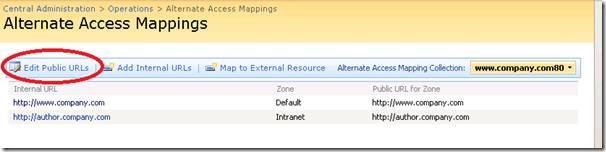
So let’s say you have http://originalurl and you want to change it to http://newurl. Don’t do it through IIS!!! Pretty much everything you will ever need to manage a Sharepoint farm will always be found in CA. Here’s how you accomplish this simple task:
1. Login to CA
2. Click the Operations tab
3. Click on “Alternate Access Mappings” under Global Configuration
4. In the top right, the default view is “Show All”. Just choose the web application you want to change.
5. Click Edit Public URLs and change the URL to whatever you want it to.
Done! Test it out and verify it works.
.NET 2.0 counters won’t show up in perfmon by default when using the /wmi switch. They will show up in you just use regular perfmon but if you are trying to monitor .NET 2.0 counters via WMI, you are stuck. Microsoft is aware of this and released 951683 to fix this issue. You can request the hotfix from CSS here:
http://support.microsoft.com/kb/951683
This hotfix is included with .NET 3.5 SP1 onward so if you have it installed, you shouldn’t experience this issue. After installing the hotfix (does not require a reboot), just restart the WMI service and run this from command line:
winmgmt /resyncperf
which will resync counters with WMI. Then open perfmon using “perfmon /wmi” and you will see the missing counters.
You can also use the wbemtest.exe utility to test and troubleshoot WMI related issues. Just run this from command line:
wbemtest.exe
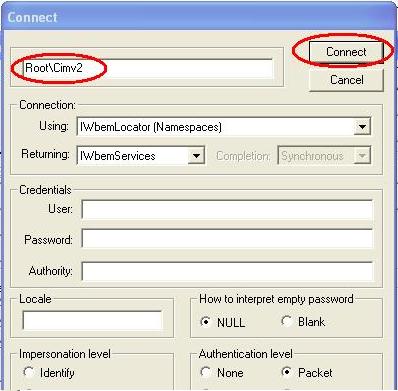
Click the Connect button and change the very first field to “root\cimv2″. Then press Connect and then click Enum Classes on the next window. Leave the superclass blank but change it to Recursive and press OK. It will query every WMI class on the server and you can click on them to get further details. This should help you tremendously if you write your own WQL queries!