Archive

Archive for March, 2012

Script to make your Citrix XenApp servers run better with SEP antivirus

March 16th, 2012 5 comments

If you use SEP (Symantec Endpoint Protection) on your Citrix servers, you will notice that performance on your server takes a huge hit if you leave Symantec as is. Specifically increased RAM and CPU usage caused by multiple instances of SmcGui.exe and ccApp.exe processes for all the connected sessions.

Symantec has a great KB article here that addresses this:

http://www.symantec.com/business/support/index?page=content&id=TECH105060

You can disable SmcGui to prevent multiple instances of it running by adding following DWORD registry value on your Citrix server:

HKLM\SOFTWARE\Symantec\Symantec Endpoint Protection\SMC\LaunchSmcGui

and setting the value to 0. You can also disable ccAPP by deleting the ccApp entry at the following keys:

32 bit:
HKLM\SOFTWARE\Microsoft\Windows\CurrentVersion\Run

64 bit:
HKLM\SOFTWARE\Wow6432Node\Microsoft\Windows\CurrentVersion\Run

I didn’t want to go to each Citrix server and verify and/or make these changes manually so I created this little bat script I can execute remotely on each Server 2008 R2 box (you’ll want to modify for 32 bit boxes):

:: Disable SmcGui
reg add "HKEY_LOCAL_MACHINE\Software\Symantec\Symantec Endpoint Protection\SMC"
 /v LaunchSmcGui /t reg_dword /d 0x0 /f

:: Disable ccApp
reg delete "HKEY_LOCAL_MACHINE\Software\Wow6432Node\Microsoft\Windows
\CurrentVersion\Run" /v ccApp /f

Now when building a new XenApp server (i.e. not from a template), I wanted to use this same script as a “post-install script” after installing XenApp but with a few other things included. One thing I wanted is to set the Terminal Server roaming profile path (assuming you are not doing it with GPO already). So I add this to the script:

:: Set TSProf to our TS profile shares
setx tsprof \\fileservername\tsprofiles$ -m

I also want to install my EdgeSight agent at this time. I wrote a a few installs script for this already in my post here:

http://www.jasonsamuel.com/2011/09/13/how-to-deploy-edgesight-5-4-xenapp-agents-using-install-scripts-to-all-your-citrix-farms/

so I will call on these bat scripts from the script I am writing now. But I want it to pause and let me verify that the Symantec changes happened successfully. So I add this first:

@ECHO OFF
ECHO Script is paused before EdgeSight install begins, verify all the 
things above executed successfully.  Press any key to begin EdgeSight
 agent install...
@ECHO ON
pause

then finally I call on the EdgeSight agent install script (which will reboot your system after installing automatically). I have it shared off my EdgeSight server under the “XENAPP_AGENT” share so my script looks like:


:: Kick off EdgeSight agent install
call "\\edgesightservername\XENAPP_AGENT\2008 R2 XA6Plus agent install 
script.bat"

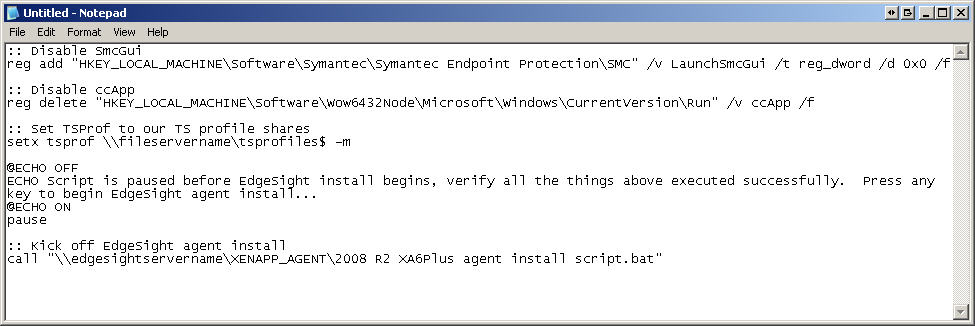
So my final script will look like this screenshot:

Hope this helps. Let me know if there is anything that any of you would like to see added.