We’ve all have had to use the Configure Email and Internet Connection Wizard (aka CEICW) in SBS 2003 to resolve connectivity issues to the Internet, resolve issues with domain logons for users after a service pack upgrade, to get Exchange mail flow going again, etc. The CEICW was considered the “shotgun” method of fixing network connectivity problems. With the release of Small Business Server 2008, CEICW has been broken down into many different wizards so you can run specific tools instead of the whole thing at once.
The Fix My Network Wizard has proven to be one of the more useful new tools in SBS 2008. It checks for issues with IIS, Certificates, Exchange, TCP/IP, DNS, DHCP, RRAS VPN, etc. and either fixes the issues or suggests a course of action to resolve the issue.
To use the FNCW tool, go to:
SBS Console > Network > Connectivity
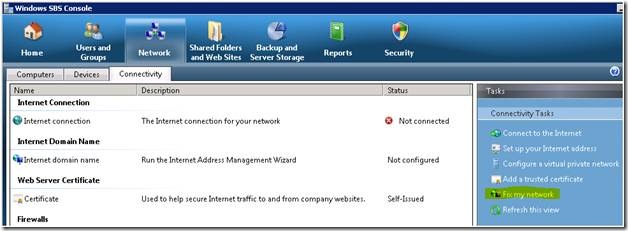
Now wait while it performs the server scan. Once it is done, it will display a list of issues it has found:
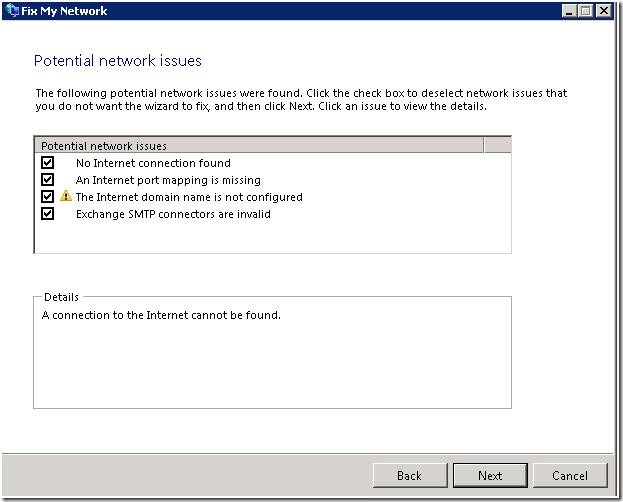
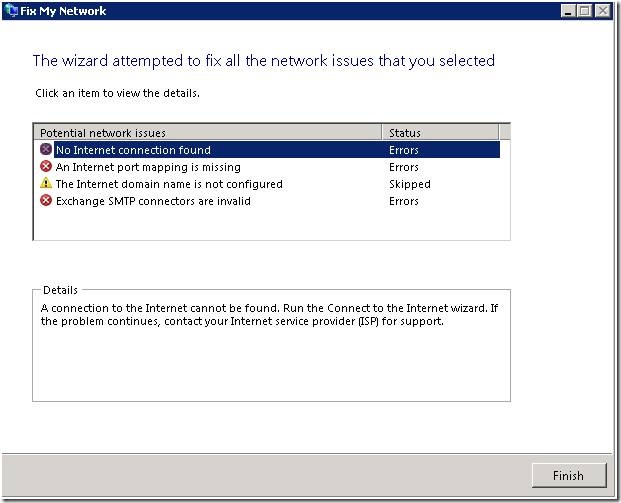
Make sure you leave the boxes checked that you want to fix and hit Next. The FNCW tool will begin fixing the issues. If the FNCW was able to fix the issue, it will display a green check box and will let you know in the Details section what it did to resolve it.
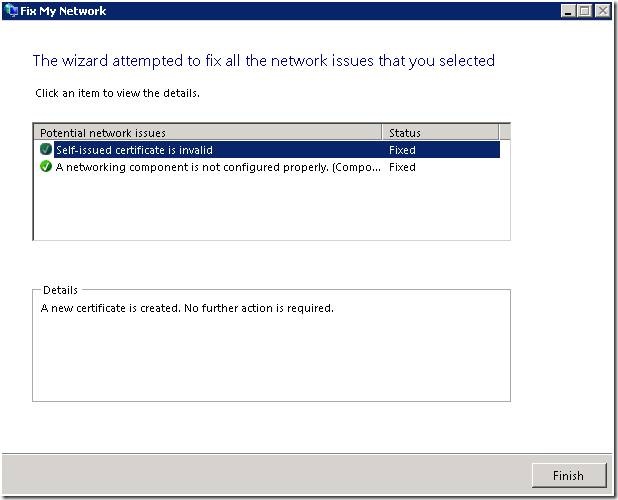
If it was unsuccessful, it will display a suggestion in the Details area describing the best course of action.